OCTRuTA and BusyCal both bring multiple calendar accounts into one place and offer ways for other people to book time with you. They take very different approaches to what a calendar app should be.
BusyCal is a mature, highly customizable calendar and task app for Apple devices. It combines detailed calendar views, integrated tasks, natural-language entry, smart filters, travel time, weather and many other productivity features. Its Mac and mobile apps are separate one-time purchases.
OCTRuTA is a simpler iPhone calendar focused on bringing work and personal schedules into one trustworthy view. Its Pro plan adds an established scheduling workflow with booking links, link-specific Protected Time, Find Time, and Google Meet or Microsoft Teams options.
If you want a deep productivity tool across Mac, iPhone, iPad and Apple Watch, BusyCal is likely the better fit. If your calendar life happens mainly on your iPhone and you want straightforward scheduling across all of your calendars, OCTRuTA may be the better choice.
OCTRuTA vs BusyCal at a glance
Free plan
OCTRuTAYesBusyCalNo free plan listed; 14-day Mac trial
Paid price
OCTRuTA$4.99/month or $39.99/yearBusyCalMac: $49.99 one-time; iPhone/iPad/Watch: $9.99 one-time
Free trial
OCTRuTA1 month of ProBusyCal14 days on Mac
Platforms
OCTRuTAiPhoneBusyCalMac plus a separate universal iPhone, iPad and Apple Watch app
Calendar accounts
OCTRuTAGoogle, Outlook/Microsoft, iCloud, iPhone calendars and iCal feedsBusyCaliCloud, Google, Exchange/Microsoft 365, CalDAV, Fastmail and more
Calendar views
OCTRuTAAgenda, Day, 3-Day and MonthBusyCalCustomizable Day, Week, Month, Year Planner and List
Tasks and Reminders
OCTRuTANoBusyCalIntegrated tasks that carry forward, plus Reminders sync
Natural-language entry
OCTRuTANoBusyCalYes, for events and tasks
Booking links
OCTRuTAYes, with ProBusyCalBusyCal Bookings beta, described on the Mac product page
Booking approval
OCTRuTAAutomatic confirmationBusyCalAutomatic confirmation or approve each request
Mac plus a separate universal iPhone, iPad and Apple Watch app
Calendar accounts
Google, Outlook/Microsoft, iCloud, iPhone calendars and iCal feeds
iCloud, Google, Exchange/Microsoft 365, CalDAV, Fastmail and more
Calendar views
Agenda, Day, 3-Day and Month
Customizable Day, Week, Month, Year Planner and List
Tasks and Reminders
No
Integrated tasks that carry forward, plus Reminders sync
Natural-language entry
No
Yes, for events and tasks
Booking links
Yes, with Pro
BusyCal Bookings beta, described on the Mac product page
Booking approval
Automatic confirmation
Automatic confirmation or approve each request
Link-specific Protected Time
Yes
No directly equivalent feature documented
Find open time across selected calendars
Yes, with Find Time
No directly equivalent automatic finder documented
Video links for new bookings
Google Meet or Microsoft Teams
Not listed in the official Bookings beta description
Purchase model
Free plan plus a Pro subscription
Separate one-time Mac and mobile purchases; Mac also available through Setapp
US pricing and official feature details checked November 17, 2026. BusyCal's Mac and mobile apps are sold separately.
When is BusyCal the better choice?
BusyCal is the better choice if you want your calendar to be a deep productivity system, prefer one-time purchases, or need to manage your schedule from more than an iPhone.
A mature calendar across Apple devices
BusyCal offers a Mac app and a separate universal mobile app for iPhone, iPad and Apple Watch. The Mac version requires macOS 13.5 or later; the mobile version requires iOS 15 or later.
That gives you several places to review and manage your schedule, including a menu-bar calendar on Mac and widgets on mobile devices.
OCTRuTA is currently built only for iPhone. If you regularly plan from a Mac, want an iPad layout or need Apple Watch access, BusyCal has a clear advantage.
Far more control over how your calendar looks
BusyCal includes customizable Day, Week, Month, Year Planner and List views. You can adjust details such as density, colors, fonts and the information shown in events.
Calendar Sets let you switch between groups of calendars, while Smart Filters, tags and search tools help you focus on particular events or tasks.
OCTRuTA deliberately keeps its view choices simpler: Agenda, Day, 3-Day and Month. That can be easier to use, but it does not offer BusyCal's depth of customization.
Tasks live alongside events
BusyCal integrates tasks directly into the calendar. Dated tasks can appear alongside events, unfinished tasks can carry forward, and Reminders sync keeps compatible task lists connected.
It also supports natural-language entry for creating both events and tasks.
OCTRuTA does not currently include a task manager, Reminders integration or comparable natural-language entry.
A broader set of planning tools
BusyCal's official feature pages also document:
Travel time and maps
Weather and moon phases
Time-zone support
Tags and Smart Filters
Calendar Sets
Menu-bar calendar access on Mac
Widgets
Local backups
Calendar import and export
Sync with iCloud, Google, Exchange/Microsoft 365, CalDAV, Fastmail and Todoist
If you want one app to handle calendars, tasks and detailed day planning, BusyCal offers considerably more functionality.
One-time purchases instead of an app subscription
BusyCal for Mac costs $49.99, and the universal iPhone, iPad and Apple Watch app costs $9.99. They are separate purchases, so you can buy only the platform you need.
If you do buy both separately, the combined listed price is $59.98—not a required bundle. BusyCal for Mac is also available through Setapp.
For someone who strongly prefers paying once rather than maintaining a Pro subscription, BusyCal is the more appealing pricing model.
Why choose OCTRuTA over BusyCal?
BusyCal offers more calendar and productivity features overall. OCTRuTA takes a narrower approach: make multiple calendars easy to understand on an iPhone, then build scheduling around the reality that your work and personal calendars all matter.
A simpler iPhone-first calendar
OCTRuTA brings Google, Outlook, iCloud, supported iCal feeds and the calendars already on your iPhone into one view.
Its Agenda, Day, 3-Day and Month views focus on helping you see what is happening without asking you to configure a larger productivity system.
If BusyCal's extensive settings feel like more than you need, OCTRuTA's narrower focus may be an advantage rather than a limitation.
A genuinely free unified calendar
OCTRuTA's free plan lets you connect and view your calendars without starting a paid subscription.
You only need Pro for scheduling features such as booking links, Find Time and Protected Time.
BusyCal's official pages list paid one-time purchases, with a 14-day trial for the Mac version. The mobile app is a separate $9.99 purchase.
A full month to try Pro
OCTRuTA Pro includes a one-month free trial. BusyCal's Mac trial is 14 days.
The longer OCTRuTA trial gives you more time to connect every account, create real booking links and test how Protected Time fits into your normal routine before paying.
Protected Time that can differ between booking links
Protected Time is one of the most distinctive parts of OCTRuTA's scheduling system.
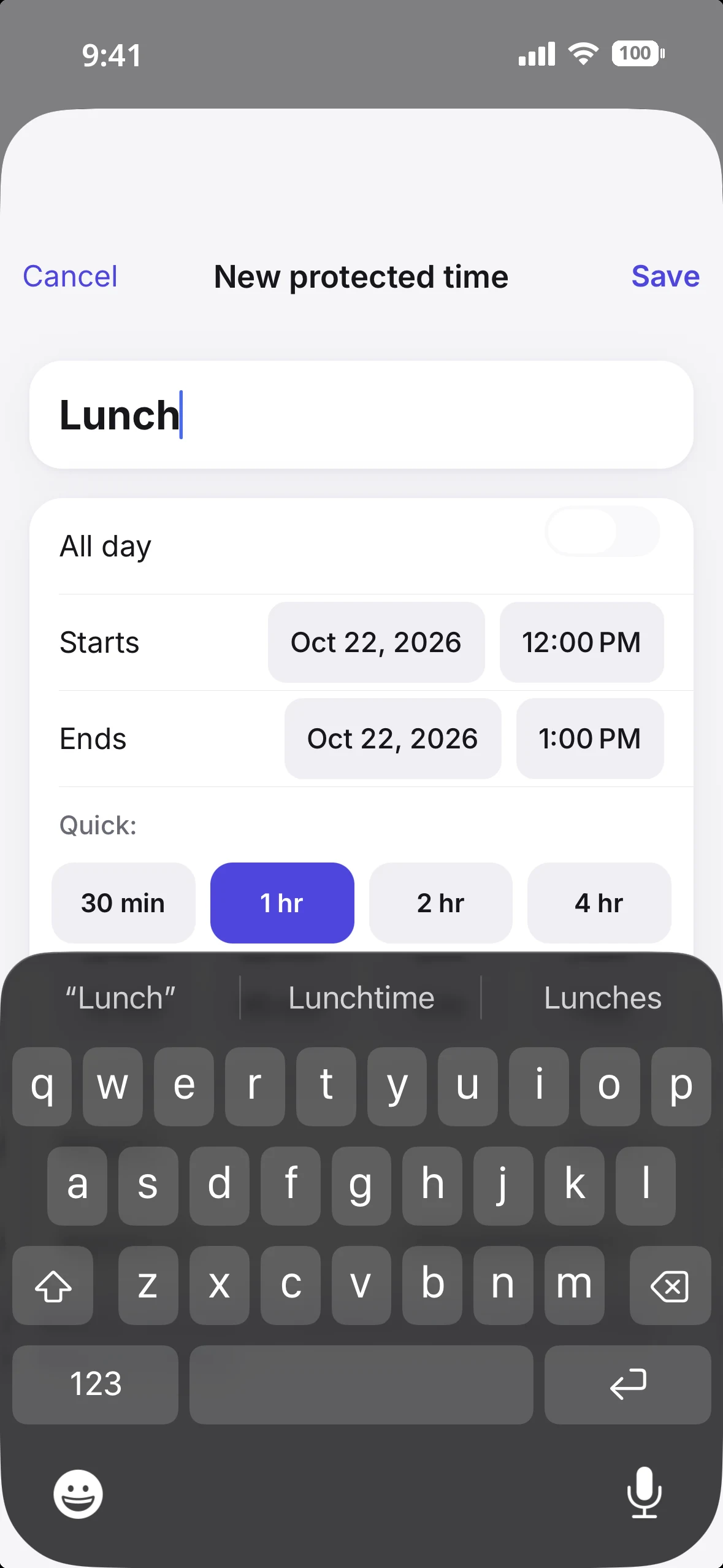
You can protect periods such as lunch, focus time, school pickup, commuting or family time. A block can be one-time or recurring.
More importantly, you decide which booking links each block applies to.
For example, 3:00–4:00 PM could be protected on a work consultation link while remaining available on a separate personal meeting link.
That is different from simply marking the same period busy for every kind of booking.
Find Time searches selected calendars for you
OCTRuTA Pro's Find Time searches the calendars you choose for conflict-free openings.
Choose how much time you need, the date range, your working hours and which calendars matter. OCTRuTA returns available windows while accounting for Protected Time.
BusyCal provides powerful ways to view and filter calendars, but its official feature pages do not document a directly equivalent automatic Find Time workflow.
Scheduling designed around work and personal calendars together
Your work calendar might show an empty afternoon while your personal calendar contains a dentist appointment, school pickup or family commitment.
OCTRuTA booking links can check the Google, Outlook, iCloud and supported iCal calendars you select before offering a time.
That lets your personal schedule protect your work availability without copying private events onto a work calendar.
What do you get without paying?
OCTRuTA has an ongoing free plan. BusyCal offers a time-limited Mac trial and separate one-time purchases rather than a free tier listed on its official product pages.
OCTRuTA Free
OCTRuTA's free version lets you bring your calendars together on your iPhone.
Connect Google, Microsoft Outlook and iCloud calendars
View calendars already stored on your iPhone
Add private, view-only iCal feeds
See calendars together in Agenda, Day, 3-Day and Month views
Create, edit and delete supported calendar events
RSVP to invitations from supported providers
Add Google Meet or Microsoft Teams links to events
Search across your calendars
Use home-screen widgets
View calendars shared with you by other OCTRuTA users
Color-code individual calendars
BusyCal before purchase
The Mac version offers a 14-day free trial, after which the listed purchase price is $49.99. It requires macOS 13.5 or later and is also available through Setapp.
The universal iPhone, iPad and Apple Watch app is listed as a $9.99 one-time purchase with no subscription. It requires iOS 15 or later.
The Mac and mobile products are separate purchases. You do not need to buy both if you only use one platform.
How much does each one cost?
The pricing models are fundamentally different: OCTRuTA Pro is a subscription with a free calendar tier, while BusyCal sells its Mac and mobile apps separately as one-time purchases.
OCTRuTA
Free calendar plan
Pro: $4.99/month
Pro: $39.99/year
1-month free trial of Pro
BusyCal for Mac
$49.99 one-time purchase
14-day free trial
Requires macOS 13.5 or later
Also available through Setapp
BusyCal for iPhone, iPad and Apple Watch
$9.99 one-time purchase
One universal app for all three device types
No subscription listed
Requires iOS 15 or later
If you need both BusyCal versions, their separate listed prices total $59.98. That is an optional combination, not a mandatory bundle.
OCTRuTA can be less expensive to start with because its calendar plan is free and Pro has a one-month trial. BusyCal's one-time pricing can be less expensive over the long run, especially if you only need the $9.99 mobile app.
The better value therefore depends on whether you want OCTRuTA's specific Pro scheduling workflow or BusyCal's broader calendar and task feature set.
How do the booking links compare?
Both products can give other people a booking page where they choose a time that works with your calendar.
The important difference is maturity and focus: BusyCal's Mac page currently describes **BusyCal Bookings as beta**, while booking links are an established part of OCTRuTA Pro.
BusyCal should not be described as lacking booking links. It has them, but its publicly documented beta features are not identical to OCTRuTA's scheduling workflow.
Share a booking page for a call, consultation or longer meeting
Set your available hours
Choose which calendars BusyCal checks
Confirm bookings automatically or approve each request
Keep existing event titles, locations, notes and guest lists private
Add confirmed bookings to your calendar
Those are the core ingredients of a useful booking system. Because it is beta and the official description is relatively concise, check the current product before assuming support for more advanced controls or integrations.
OCTRuTA Booking Links
OCTRuTA's booking links are part of a broader Pro scheduling workflow designed around multiple work and personal calendars.
Each link can have its own:
Meeting duration
Available hours
Buffer
Minimum notice
Daily booking limit
Destination calendar
Cancellation and rescheduling cutoff
Google Meet or Microsoft Teams option
Availability can be checked against the Google, Outlook, iCloud and supported iCal calendars you select.
OCTRuTA also places a 10-minute temporary hold on a selected time while someone completes the booking, helping prevent two people from claiming the same slot at once.
The most meaningful differences
OCTRuTA adds link-specific Protected Time, so a block can affect one booking link without affecting another.
It also offers Find Time for locating openings across selected calendars, and can create Google Meet or Microsoft Teams links for new bookings.
BusyCal's official Bookings beta description does not list directly equivalent versions of those features. That does not make BusyCal's booking support nonexistent; it means the two products currently emphasize different scheduling capabilities.
BusyCal's option to approve each booking request is worth noting if you want to review requests manually. OCTRuTA booking links automatically confirm available slots.
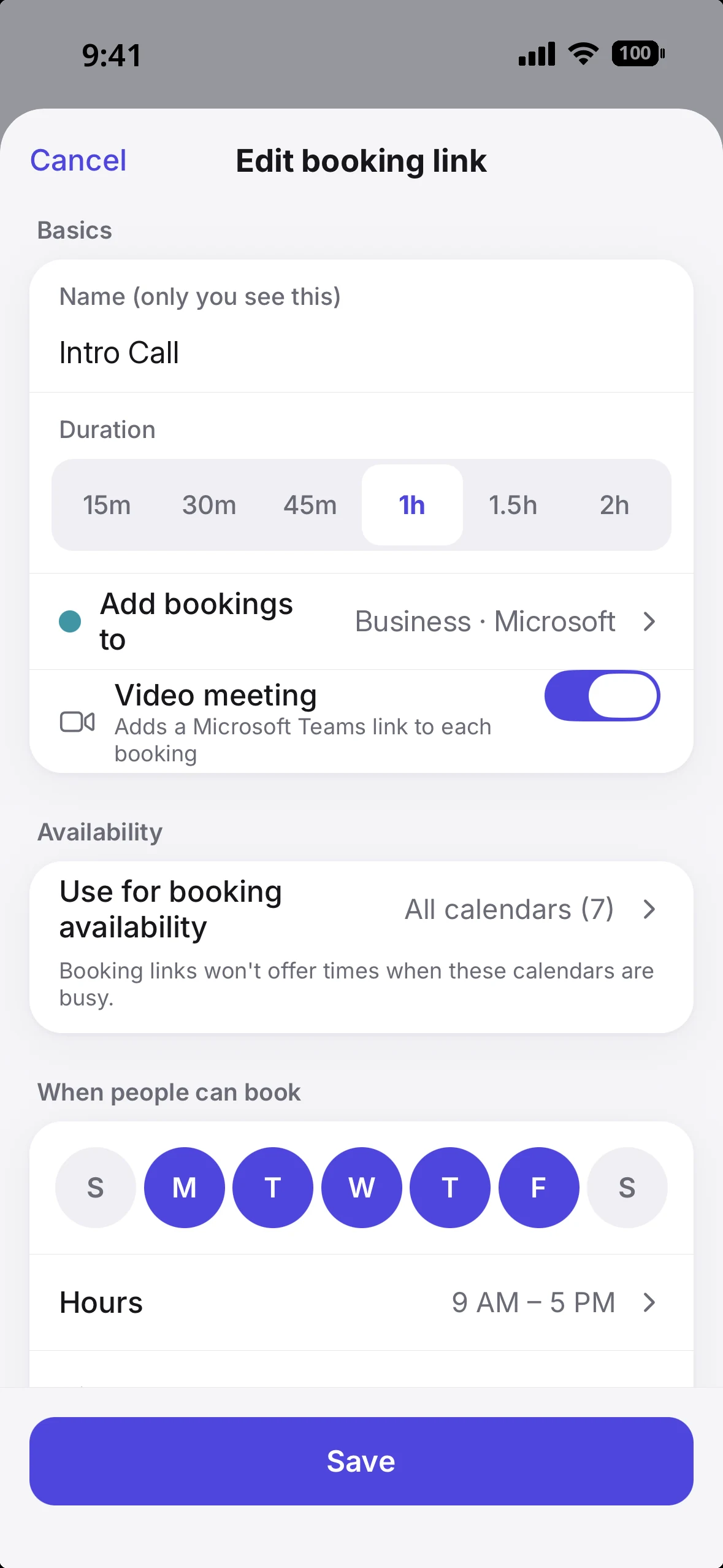
OCTRuTA booking link settings: length, destination calendar, automatic Teams links and which calendars count as busy.Protected Time can apply to selected booking links without blocking every link.
What are OCTRuTA's limitations?
OCTRuTA's focused approach also means giving up some of the things BusyCal does well.
iPhone only. There is no OCTRuTA Mac, iPad or Apple Watch app.
No integrated task manager. BusyCal includes tasks, carry-forward behavior and Reminders sync.
No natural-language event creation. BusyCal supports it for events and tasks.
Fewer view and customization options. BusyCal offers more views, Calendar Sets, Smart Filters, tags and display controls.
No built-in weather, moon phases, travel time, maps or menu-bar calendar. These are documented BusyCal features.
No Zoom creation for bookings. OCTRuTA can add Google Meet or Microsoft Teams links, but it does not currently create Zoom links.
There is also an important availability distinction: calendars stored only locally on your iPhone can be displayed in OCTRuTA, but cannot currently be used to calculate booking-link availability.
To include an Apple/iCloud calendar in booking availability, connect iCloud directly through CalDAV. An Apple app-specific password may be required. Google and Microsoft calendars can also be connected directly.
New OCTRuTA bookings are added to a Google or Outlook calendar you choose, so one of those must be connected to take bookings.
Which calendar app is better for you?
There is no single winner. Choose based on the devices you use, whether you need tasks, and how important booking workflows are to your day.
Choose BusyCal if…
You want to manage your calendar on Mac, iPad or Apple Watch as well as iPhone.
You want integrated tasks and Reminders sync.
You like natural-language event and task creation.
You want highly customizable Day, Week, Month, Year Planner and List views.
You use Calendar Sets, Smart Filters or tags to organize a complex schedule.
You want travel time, maps, weather, moon phases or menu-bar access.
You prefer a one-time purchase over an ongoing app subscription.
You only need one platform and want to buy just the Mac or mobile version.
You want to try BusyCal Bookings beta and value manual booking approval.
Choose OCTRuTA if…
Your calendar life primarily happens on your iPhone.
You want a free way to bring work and personal calendars into one view.
You prefer a simpler calendar over extensive productivity settings.
You want booking links that check several selected calendars.
You want Protected Time that can differ between booking links.
You want Find Time to search selected calendars for openings.
You want automatic Google Meet or Microsoft Teams links for bookings.
You want a full month to try Pro.
You do not need tasks, weather, travel time or a desktop calendar app.
Bottom line
BusyCal is the deeper all-around calendar and task application. OCTRuTA is the more focused iPhone scheduling app.
BusyCal offers mature Apple-platform calendar software, extensive customization, integrated tasks, natural-language entry and a long list of planning features. Its separate one-time Mac and mobile purchases are compelling if you prefer not to subscribe.
OCTRuTA focuses on a narrower problem: your life is spread across several calendars, and you should be able to see them together and schedule around all of them.
BusyCal now has a Bookings beta, so the choice is not booking links versus no booking links. The difference is that OCTRuTA Pro centers on an established scheduling workflow with link-specific Protected Time, Find Time, and Google Meet or Microsoft Teams options.
For a power user who wants calendars and tasks across Apple devices, BusyCal is difficult to beat. For an iPhone user who wants a simpler unified calendar and scheduling that respects both work and personal commitments, OCTRuTA is the more focused choice.
Features and pricing can change. Check each provider's current website or App Store listing before purchasing. BusyCal Bookings is described as beta, so its capabilities may change as it develops.
Frequently asked questions
Is OCTRuTA cheaper than BusyCal?
+
It depends on which BusyCal app you need and how long you use it. OCTRuTA has a free plan, and Pro is $4.99/month or $39.99/year after a one-month trial. BusyCal for iPhone, iPad and Apple Watch is a separate $9.99 one-time purchase, while BusyCal for Mac is $49.99 with a 14-day trial. BusyCal can cost less over time because it is not a subscription; buying both BusyCal apps is only necessary if you want both platforms.
Does BusyCal have booking links?
+
Yes. BusyCal's Mac product page describes BusyCal Bookings as beta. You can share a booking page, set your hours, choose which calendars are checked, and either confirm bookings automatically or approve each request. Existing event details remain private. OCTRuTA also offers booking links through Pro, with additional controls such as link-specific Protected Time and Google Meet or Microsoft Teams options.
Does OCTRuTA work on Mac, iPad or Apple Watch?
+
No. OCTRuTA is currently an iPhone app. BusyCal is the better fit if you want a calendar on Mac, iPad or Apple Watch. People using your OCTRuTA booking links do not need an iPhone or the OCTRuTA app; they can open the booking page in a web browser.
Does OCTRuTA have tasks, natural-language entry or weather?
+
No. BusyCal includes integrated tasks that carry forward, Reminders sync, natural-language event and task entry, weather, moon phases, travel time, maps, tags, Smart Filters and other productivity tools. OCTRuTA currently focuses on calendars and scheduling rather than task management or those extras.
Can both apps combine iCloud, Google and Microsoft calendars?
+
Yes, although their supported account lists and setup differ. OCTRuTA connects Google, Microsoft Outlook, iCloud and supported iCal feeds, and can display calendars already on your iPhone. BusyCal supports iCloud, Google, Exchange/Microsoft 365, CalDAV, Fastmail and other services. Check each app's current documentation for the exact account type you use.
Is BusyCal a subscription?
+
No subscription is required for the separate BusyCal Mac or universal iPhone/iPad/Apple Watch purchases listed on BusyMac's official pages. The Mac version costs $49.99 and the mobile version costs $9.99. BusyCal for Mac is also available through Setapp, which is a separate subscription service.
Do people booking me need OCTRuTA or an account?
+
No. They open your OCTRuTA booking link in a browser, see available times in their time zone and select a slot. OCTRuTA temporarily holds the selected time while they complete the booking. Once confirmed, the event is added to your chosen calendar and the guest can add the meeting to their own calendar.
Does BusyCal work on Windows, Android or the web?
+
BusyCal is focused on Apple platforms. BusyMac's official product pages cover a Mac app and a separate universal iPhone, iPad and Apple Watch app; they do not list Windows, Android or a general web calendar app. A booking page working in a browser is separate from offering a full web calendar app.