Calendly is a booking tool. OCTRuTA is a calendar app with booking built in. If you only need people to book you, Calendly does that well. If your week is split across work, personal and family calendars, here's how they compare.
When is Calendly the better choice?
Calendly is the better choice if you need shared team booking, payments at booking, or a web or Android app.
Shared booking across a team. If one link needs to spread meetings across several people, route leads by form answers, or be managed from an admin console, Calendly's Teams plan is built for that. OCTRuTA gives each person their own booking links that check all of their calendars, which suits small businesses where everyone books their own time.
Getting paid. Calendly's paid plans can collect payment at booking through Stripe or PayPal. OCTRuTA doesn't take payments.
Everywhere you work. Calendly has a web app, an Android app, browser extensions, and CRM connections like HubSpot and Salesforce. OCTRuTA is iPhone-only for now.
Why choose OCTRuTA over Calendly?
Choose OCTRuTA if your week runs across work, personal and family calendars, including iCloud, and you want booking links that check all of them.
Every calendar, free. Calendly's free plan connects 1 calendar, and paid plans connect up to 6. OCTRuTA connects unlimited Google, Outlook, iCloud and iPhone calendars on the free plan.
A real calendar app. See, create and edit events across every account in one view. Calendly doesn't replace your calendar app.
Protected Time. Block family dinner or a workout and booking links treat it as busy. Choose which links each block applies to.
How do I get my iCloud calendar into OCTRuTA booking links?
Connect iCloud to OCTRuTA with CalDAV, using your Apple ID and an app-specific password.
Create an app-specific password. Sign in at account.apple.com, open Sign-In and Security, and choose App-Specific Passwords. Your Apple ID needs two-factor authentication turned on.
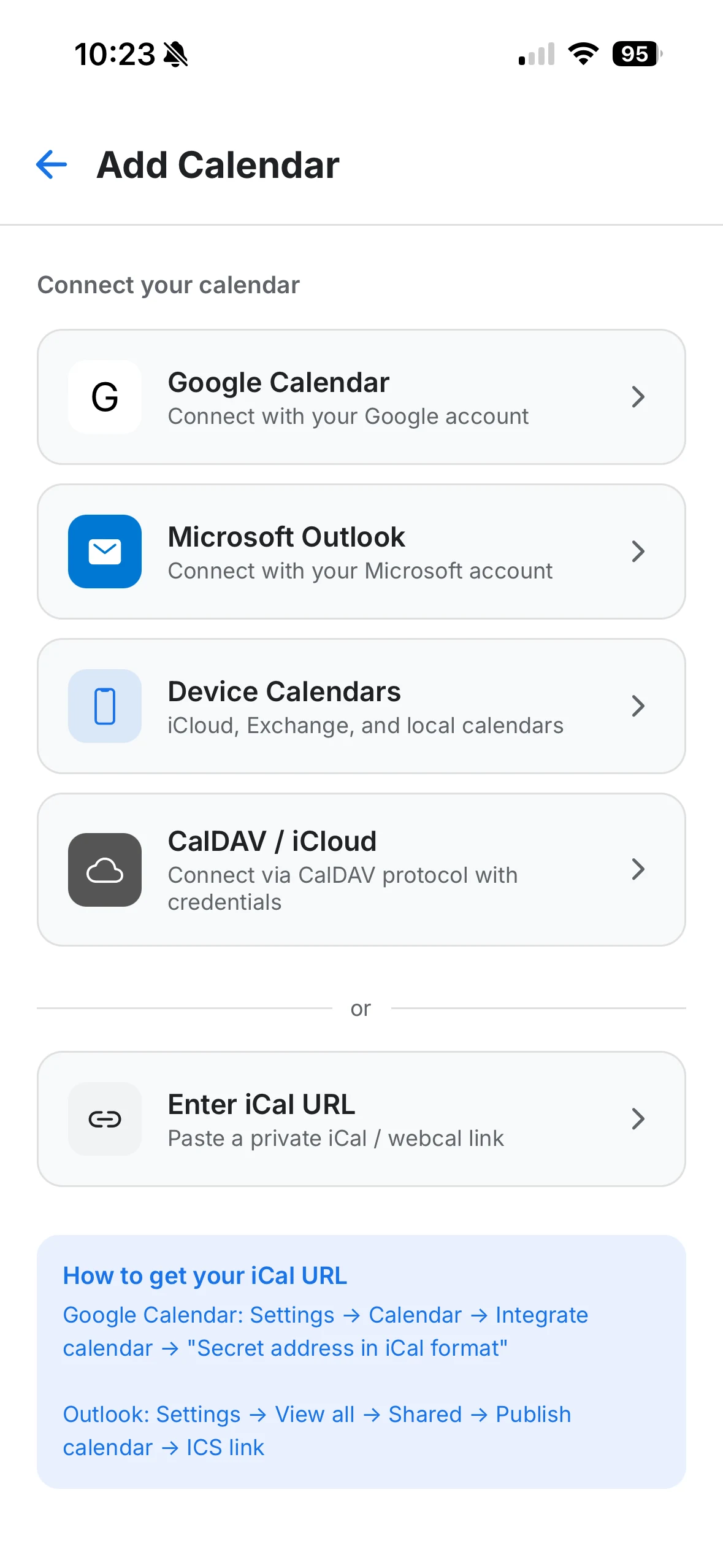
In OCTRuTA, add a calendar and choose CalDAV / iCloud. Enter your Apple ID email and the app-specific password, not your regular Apple ID password.
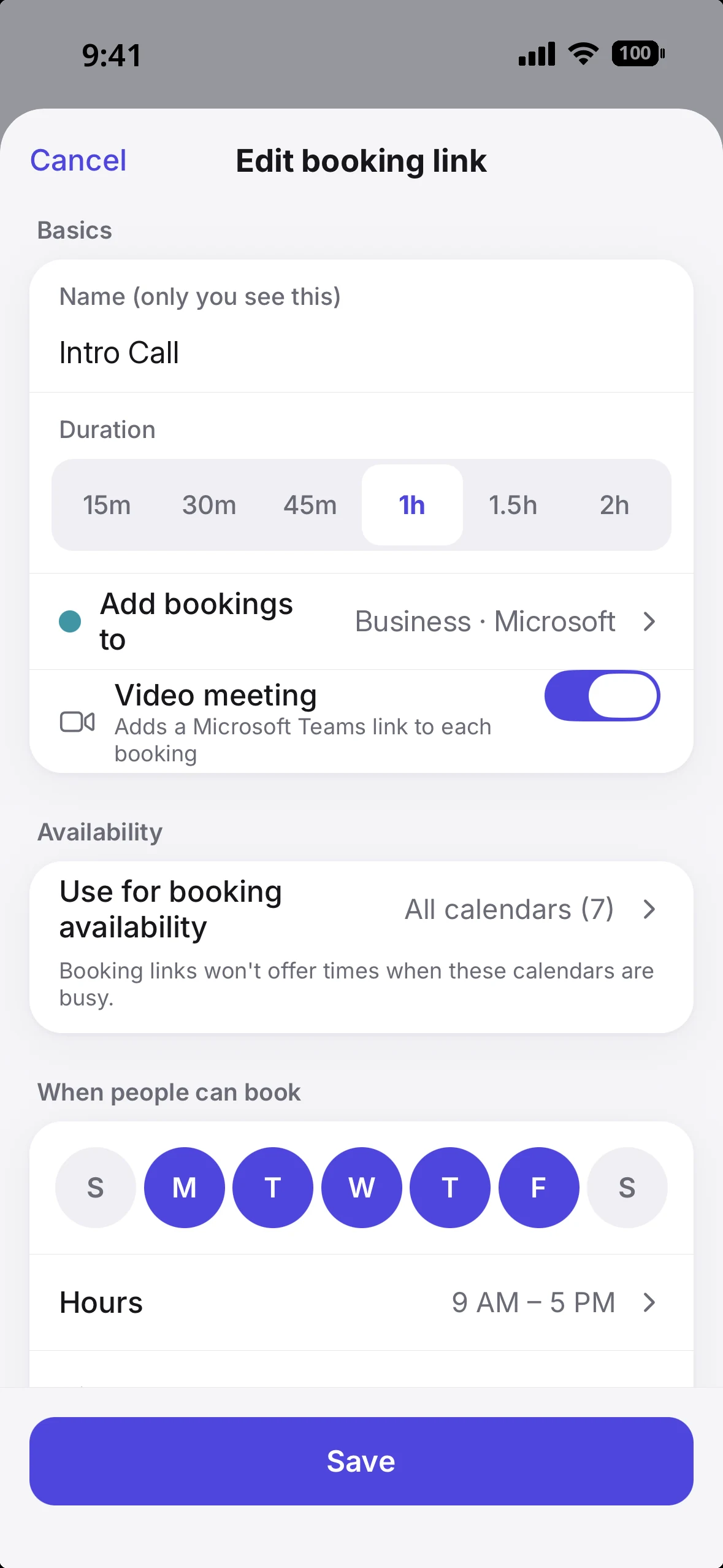
In your booking link's settings, turn on "Use for booking availability" for the iCloud calendars you want checked.
That's the step Calendly no longer offers new users. Once it's done, your family calendar counts as busy when someone books you.
Step 2: choose CalDAV / iCloud on the Add Calendar screen.Step 3: pick the calendars under Use for booking availability.
What does it cost to check all of my calendars?
With OCTRuTA, connecting every calendar is free, and booking links that check them cost $39.99 a year.
Take a common week: a Google calendar for work, an Outlook calendar a client gave you, and an iCloud calendar your family shares.
On Calendly. The free plan connects 1 calendar, so checking all three means Standard at $10 per seat per month, billed yearly ($120 a year). Even then, the iCloud calendar can't be added to an account that didn't connect iCloud before August 20, 2024.
On OCTRuTA. All three connect on the free plan. Pro, which adds booking links, is $4.99 a month or $39.99 a year, and the first month is free.
(Prices as of November 2026.)
Which one fits you?
Pick by whose calendars a booking has to respect.
A parent with a shared family calendar. Practices, pickups and dinner live in iCloud; work lives in Outlook. OCTRuTA: booking links check both, and Protected Time keeps evenings off your work link.
A consultant with more than one work account. Your own Google Workspace plus a client's Microsoft 365. OCTRuTA: one link checks both, so you aren't double-booked across clients.
A sales or recruiting team. Meetings need to spread across several people or route by form answers. Calendly's Teams plan.
You charge for sessions at booking. Calendly's paid plans collect payment through Stripe or PayPal.
How do I switch from Calendly to OCTRuTA?
Recreate your booking link in OCTRuTA, then swap the link wherever you share it.
Connect your calendars in OCTRuTA, including iCloud through CalDAV.
Create a booking link with the same meeting length, hours, buffers and minimum notice you used in Calendly. Add up to five questions for bookers.
Choose the Google or Outlook calendar new bookings should land on.
Replace your Calendly link in your email signature, website and anywhere else you share it.
Keep your Calendly account until meetings already booked there have passed. Those meetings are on your calendar, so OCTRuTA's booking links already treat them as busy.
What's the catch with OCTRuTA?
OCTRuTA booking links can't check calendars that live only on your iPhone. Connect iCloud with CalDAV, or connect Google or Outlook directly, to include them. And OCTRuTA is iPhone-only for now.
New bookings are added to a Google or Outlook calendar you choose, so you need one of those connected to take bookings. iCloud can be checked for busy time, but it isn't a destination for new bookings. Some employers require IT approval before apps can connect to a work Microsoft 365 or Google Workspace calendar; if yours does, ask IT to approve OCTRuTA or use a published calendar link instead. Booking links and new events can add Google Meet or Microsoft Teams links automatically. Zoom links already on your calendar open fine, but OCTRuTA doesn't create Zoom links yet.
Calendars on the free plan
OCTRuTAUnlimitedCalendly1
iCloud calendar checking
OCTRuTAYes, via CalDAVCalendlyNo new connections since Aug 2024
Full calendar app
OCTRuTAYesCalendlyNo
Protected personal time
OCTRuTAYes (Pro)CalendlyNo
Team round-robin
OCTRuTANoCalendlyYes (Teams plan)
Payments at booking
OCTRuTANoCalendlyYes (paid plans)
Platforms
OCTRuTAiPhoneCalendlyWeb, iPhone, Android
Paid plan price
OCTRuTA$4.99/mo or $39.99/yrCalendly$10/seat/mo billed yearly
Feature
OCTRuTA
Calendly
Calendars on the free plan
Unlimited
1
iCloud calendar checking
Yes, via CalDAV
No new connections since Aug 2024
Full calendar app
Yes
No
Protected personal time
Yes (Pro)
No
Team round-robin
No
Yes (Teams plan)
Payments at booking
No
Yes (paid plans)
Platforms
iPhone
Web, iPhone, Android
Paid plan price
$4.99/mo or $39.99/yr
$10/seat/mo billed yearly
Where do these details come from?
From each company's own pages, checked November 2026.
What else do people ask about OCTRuTA vs Calendly?
Can I use OCTRuTA if Calendly won't connect my iCloud calendar?
+
Yes. Connect iCloud to OCTRuTA with CalDAV and your booking links check it live, alongside Google and Outlook.
Is OCTRuTA free?
+
The calendar app is free, including unlimited connected calendars. Booking links, Find Time and Protected Time are part of OCTRuTA Pro, which is free for your first month, then $4.99 a month or $39.99 a year.
Does OCTRuTA work for teams?
+
Yes, for teams where each person books their own time. Everyone gets booking links that check their work and personal calendars, and calendar sharing lets colleagues see each other's availability. OCTRuTA doesn't do round-robin or lead routing, and each person subscribes to Pro individually through the App Store.
Do the people booking me need OCTRuTA or an account?
+
No. They open your link in any browser, see open times in their own time zone, and get a 10-minute hold on the slot while they fill in their details. Once they confirm, the event lands on your calendar and they get a calendar file to add it to theirs.
Can guests reschedule or cancel?
+
Yes. They can change or cancel from their confirmation, up to a cutoff you set, and a cancelled slot goes straight back to your availability.