OCTRuTA and Google Calendar can both help you manage events and let other people book time with you. The bigger difference is where each one fits into your calendar life.
Google Calendar is a mature calendar service with a strong free core product, apps across major platforms, and deep connections to Gmail, Google Tasks, Google Meet and shared calendars. Its appointment schedules add booking pages, with more advanced features available on eligible plans.
OCTRuTA is a focused iPhone app that brings Google, Microsoft Outlook, iCloud, device calendars and supported iCal feeds into one view. Pro adds booking links, Find Time and link-specific Protected Time, with Google Meet and Microsoft Teams options for bookings.
If you want a free calendar that works nearly everywhere and connects closely with Google's ecosystem, Google Calendar is hard to beat. If your schedule spans several providers and you primarily manage it on an iPhone, OCTRuTA offers a more focused cross-provider scheduling experience.
OCTRuTA vs Google Calendar at a glance
Core calendar price
OCTRuTAFree plan availableGoogle CalendarFree with a personal Google Account
OCTRuTA Pro
OCTRuTA$4.99/month or $39.99/year; 1-month trialGoogle CalendarNot applicable
Platforms
OCTRuTAiPhoneGoogle CalendarWeb, Android, iOS, Wear OS and Apple Watch
Calendar accounts and sources
OCTRuTAGoogle, Microsoft Outlook, iCloud/CalDAV, device calendars and supported iCal feedsGoogle CalendarGoogle calendars plus sharing, imports, subscriptions and supported integrations
Tasks
OCTRuTANo integrated task managerGoogle CalendarGoogle Tasks with a date or time appear in Calendar
Booking pages
OCTRuTAYes, with ProGoogle CalendarAppointment schedules; one page free with a personal account
Multiple booking pages
OCTRuTAYes, with ProGoogle CalendarAvailable with eligible premium plans; personal accounts and Business Starter include one
Where to create a booking page
OCTRuTAIn the iPhone appGoogle CalendarIn a computer browser, not the mobile Calendar apps
Scheduling controls
OCTRuTADuration, hours, buffers, minimum notice, daily limits and destination calendarGoogle CalendarDuration, availability, scheduling windows, lead time, buffers, daily limits and booking-form fields
Meeting choices for bookings
OCTRuTAGoogle Meet or Microsoft TeamsGoogle CalendarGoogle Meet, in-person or phone
OCTRuTAYes, with Find TimeGoogle CalendarCalendar availability and collaboration tools; not the same standalone Find Time workflow
Workplace suite
OCTRuTANo; focused calendar and scheduling appGoogle CalendarGoogle Workspace plans bundle Calendar with other workplace services
Feature
OCTRuTA
Google Calendar
Core calendar price
Free plan available
Free with a personal Google Account
OCTRuTA Pro
$4.99/month or $39.99/year; 1-month trial
Not applicable
Platforms
iPhone
Web, Android, iOS, Wear OS and Apple Watch
Calendar accounts and sources
Google, Microsoft Outlook, iCloud/CalDAV, device calendars and supported iCal feeds
Google calendars plus sharing, imports, subscriptions and supported integrations
Tasks
No integrated task manager
Google Tasks with a date or time appear in Calendar
Booking pages
Yes, with Pro
Appointment schedules; one page free with a personal account
Multiple booking pages
Yes, with Pro
Available with eligible premium plans; personal accounts and Business Starter include one
Where to create a booking page
In the iPhone app
In a computer browser, not the mobile Calendar apps
Scheduling controls
Duration, hours, buffers, minimum notice, daily limits and destination calendar
Duration, availability, scheduling windows, lead time, buffers, daily limits and booking-form fields
Meeting choices for bookings
Google Meet or Microsoft Teams
Google Meet, in-person or phone
Availability across multiple calendars
Check selected supported connected calendars
Available with eligible premium appointment plans
Premium booking extras
One straightforward Pro plan
Eligible plans can add reminders, Stripe payments, email verification, secondary-calendar schedules and co-hosts
Link-specific Protected Time
Yes
No directly equivalent feature documented
Automatic opening finder
Yes, with Find Time
Calendar availability and collaboration tools; not the same standalone Find Time workflow
Workplace suite
No; focused calendar and scheduling app
Google Workspace plans bundle Calendar with other workplace services
US pricing and official feature details checked November 17, 2026. Google appointment features and subscription availability vary by account and plan.
When is Google Calendar the better choice?
Google Calendar is the better choice if you want a capable free calendar, use several kinds of devices, or rely on Google's collaboration and productivity ecosystem.
A strong free core product
A personal Google Account includes Google Calendar at no additional charge. You can create and manage events, share calendars, use Google Meet and work with dated Google Tasks without buying a calendar subscription.
A personal account can also create one appointment-schedule booking page. For someone with simple booking needs, that may be enough without paying for any scheduling tool.
OCTRuTA has a free plan too, but its booking links, Find Time and Protected Time are part of Pro.
Use your calendar on almost any device
Google Calendar works on the web, Android, iOS, Wear OS and Apple Watch. You can move between a computer, phone, tablet or supported watch without being limited to one kind of device.
OCTRuTA is currently built only for iPhone. If you regularly plan from a browser or use Android or a smartwatch, Google Calendar has a clear advantage.
Deep integration with Google services
Google Calendar connects naturally with Gmail, Google Tasks and Google Meet. Tasks with a date or time can appear in Calendar, and supported events can be created automatically from Gmail.
Shared calendars, working hours and location, focus time and Time Insights add more ways to coordinate and understand your schedule. Some workplace capabilities require an eligible Workspace account.
OCTRuTA can add Google Meet links to events and bookings, but it does not reproduce Gmail, Google Tasks, Time Insights or the rest of Google's broader ecosystem.
Mature sharing and collaboration
Google Calendar is widely used for shared family calendars, team calendars, invitations and organizational scheduling. Its reach can make collaboration easier when the people around you already use Google services.
If that existing network matters more than a specialized cross-provider iPhone workflow, Google Calendar is likely the more practical choice.
Why choose OCTRuTA over Google Calendar?
Google Calendar offers the broader platform and ecosystem. OCTRuTA concentrates on a different problem: bringing calendars from several providers together on an iPhone and making scheduling respect all of them.
One iPhone view across calendar providers
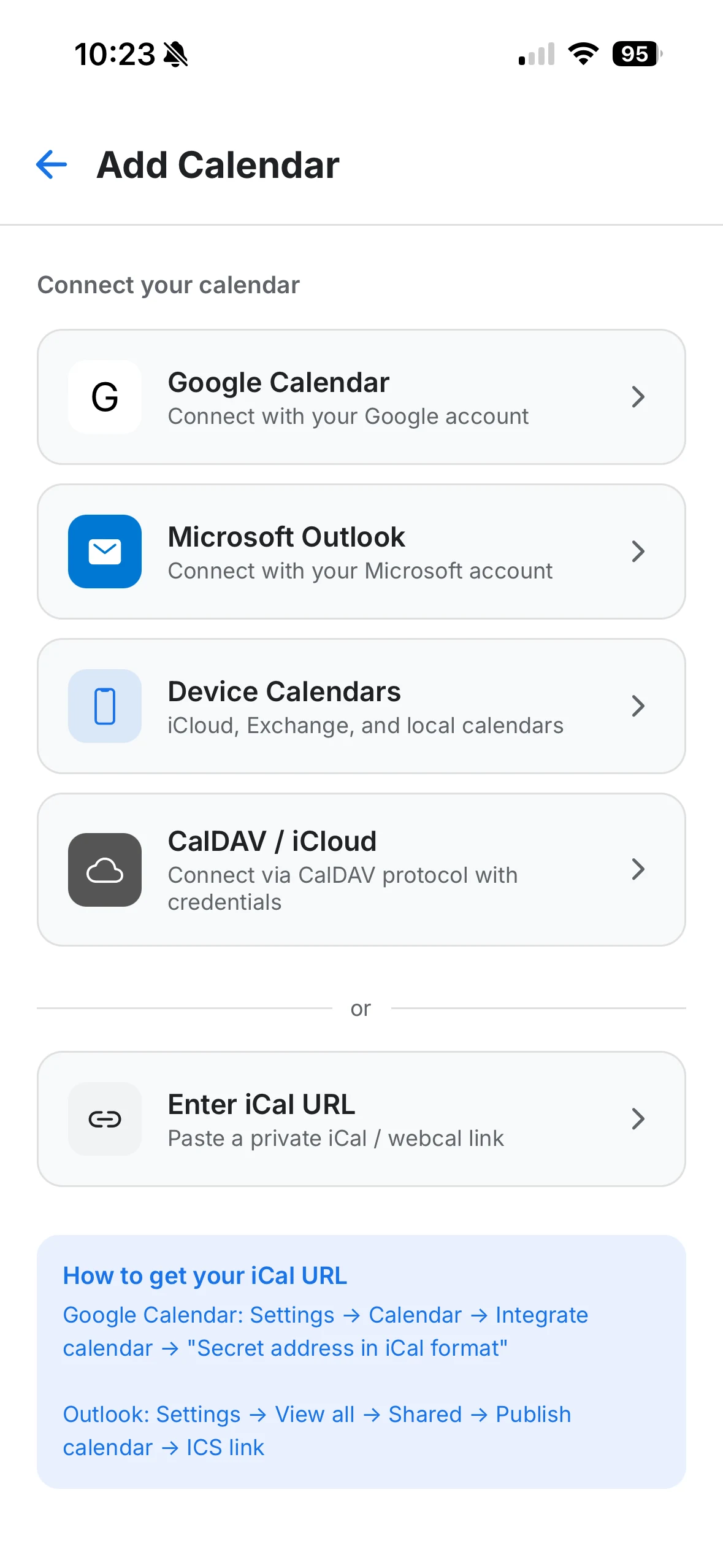
OCTRuTA connects Google, Microsoft Outlook, iCloud/CalDAV, device calendars and supported iCal feeds in one app.
Its Agenda, Day, 3-Day and Month views focus on showing your work and personal commitments together without requiring you to move everything into one provider's ecosystem.
Google Calendar also supports sharing, imports and subscriptions, so it is not accurate to say it only handles Google calendars. OCTRuTA's distinction is its direct focus on a unified cross-provider iPhone experience.
Booking links built around several calendars
An empty work calendar does not always mean you are free. Your personal calendar might contain a dentist appointment, school pickup or family commitment at the same time.
OCTRuTA Pro booking links can check the supported connected Google, Outlook, iCloud and iCal calendars you select before offering a time.
That lets personal commitments protect work availability without copying private event details onto a work calendar.
Protected Time that can differ between links
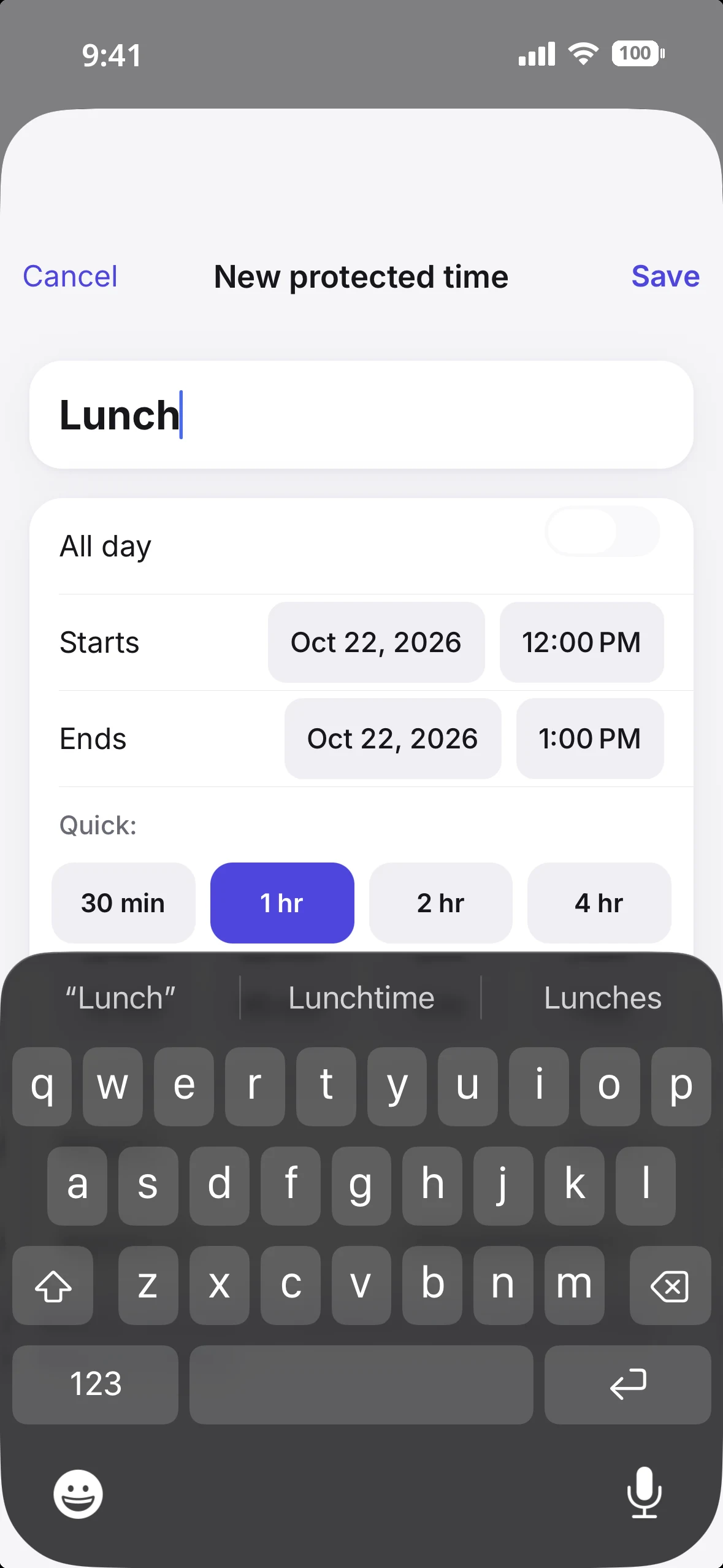
Protected Time lets you block periods such as lunch, focus time, commuting, school pickup or family time. Blocks can be one-time or recurring.
The distinctive part is that you decide which booking links each block applies to.
For example, 3:00–4:00 PM could be protected on a work consultation link while remaining available on a separate personal meeting link.
Google Calendar offers focus time, working hours and appointment availability controls, but its cited appointment documentation does not describe a directly equivalent link-specific Protected Time feature.
Find Time searches selected calendars for you
OCTRuTA Pro's Find Time searches the calendars you choose for conflict-free openings.
Choose how much time you need, the date range, your working hours and which calendars matter. OCTRuTA returns available windows while accounting for Protected Time.
Instead of visually comparing several providers yourself, you can ask OCTRuTA to identify the openings.
Scheduling on your iPhone, with one Pro price
Google requires a computer browser to create appointment schedules. OCTRuTA lets you configure its booking links in the iPhone app.
OCTRuTA Pro also has one straightforward price—$4.99/month or $39.99/year—with a one-month free trial. You do not need to compare workplace tiers to know which OCTRuTA scheduling features are included.
What do you get without paying?
Both products offer useful free experiences, but they prioritize different things. Google provides a broad calendar service and one personal booking page; OCTRuTA Free focuses on a unified iPhone calendar.
Google Calendar for free
With a personal Google Account, you can use Google Calendar's core product on supported web, mobile and watch platforms.
Create and manage calendar events
Use shared calendars and invitations
Connect with Gmail, Google Tasks and Google Meet
See dated Google Tasks in Calendar
Use one appointment-schedule booking page
Import events and subscribe to supported calendars
Premium appointment features should not be assumed to be free. Multiple schedules, automatic reminders, payments, email verification and other advanced capabilities depend on the account and plan.
OCTRuTA Free
OCTRuTA's free version brings your calendars together on your iPhone.
Connect Google, Microsoft Outlook and iCloud calendars
View calendars already stored on your iPhone
Add private, view-only iCal feeds
See calendars together in Agenda, Day, 3-Day and Month views
Create, edit and delete supported calendar events
RSVP to invitations from supported providers
Add Google Meet or Microsoft Teams links to events
Search across your calendars
Use home-screen widgets
View calendars shared with you by other OCTRuTA users
Color-code individual calendars
You need Pro for OCTRuTA booking links, Find Time and Protected Time. If Google's free appointment schedule already covers your booking needs, Google may be the better value for you.
How much does each one cost?
The pricing comparison is not simply free versus paid. Google Calendar has a free core product and plan-dependent appointment upgrades, while OCTRuTA has a free calendar tier and one Pro subscription.
OCTRuTA
Free calendar plan
Pro: $4.99/month
Pro: $39.99/year
1-month free trial of Pro
Pro includes OCTRuTA's booking links, Find Time and Protected Time. There is no separate workplace bundle to buy for those features.
The core personal calendar is free with a Google Account, and a personal account can create one appointment-schedule booking page.
Google Workspace Business Starter also includes one booking page. Premium appointment capabilities require an eligible Google One or Google Workspace plan and vary by subscription.
Google Workspace business pricing
Current standard US pricing checked November 17, 2026 lists:
Business Starter: $7/user/month on an annual commitment
Business Standard: $14/user/month on an annual commitment
Flexible month-to-month pricing is higher
Business Standard is the relevant business tier for broader premium appointment booking pages. Exact appointment capabilities still depend on the account and plan, so check Google's feature matrix rather than assuming every premium feature is included at every tier.
Workspace plans also bundle Gmail, Drive, Meet and other workplace services. Their full per-user price is not a calendar-only charge, and may be worthwhile for needs that OCTRuTA does not attempt to cover.
For an individual who only needs scheduling, OCTRuTA Pro is easier to price. For someone whose needs are met by Google's free personal account, Google remains the lower-cost option.
How do the booking links compare?
Both products offer booking pages and should be taken seriously as scheduling tools. This is not a comparison of booking links versus no booking links.
Google Calendar appointment schedules provide mature scheduling controls and plan-dependent upgrades. OCTRuTA Pro focuses on iPhone setup, selected cross-provider calendars and link-specific Protected Time.
A personal Google Account can create one appointment schedule. Business Starter can also create one, while multiple schedules and other premium capabilities are available on eligible plans.
Google's official setup documentation lists controls including:
Custom appointment duration and availability
Scheduling windows and minimum lead time
Adjusted availability and buffers
Daily booking limits
Google Meet, in-person or phone meeting choices
Booking-form fields
Depending on the eligible plan, schedules can also include automatic email reminders, payments through Stripe, email verification, secondary-calendar schedules, co-hosts and availability checks across multiple calendars.
The important setup limitation is that schedules must be created in a computer browser. They cannot be created in Google's Android or iPhone/iPad Calendar apps.
OCTRuTA Booking Links
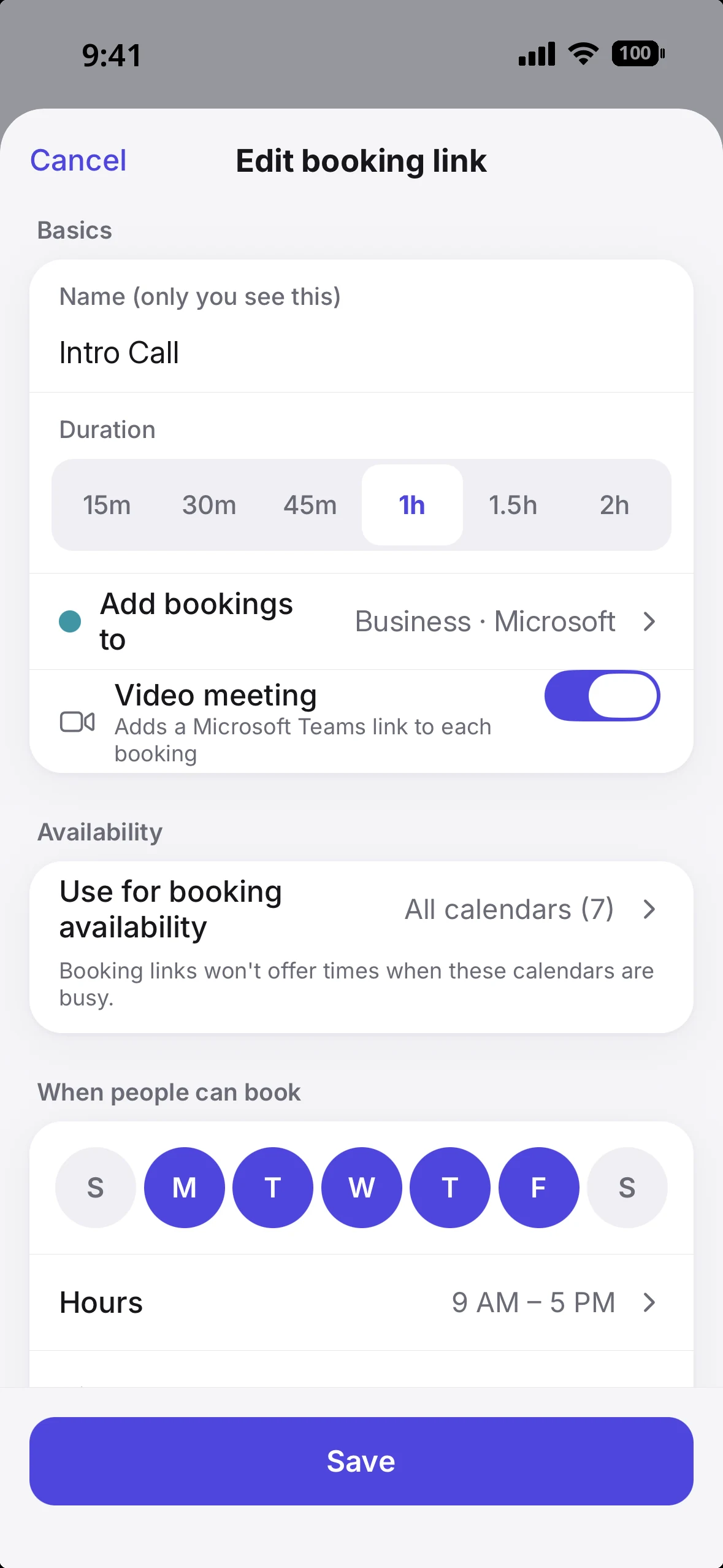
OCTRuTA's booking links are created and managed in the iPhone app as part of Pro.
Each link can have its own:
Meeting duration
Available hours
Buffer
Minimum notice
Daily booking limit
Destination calendar
Cancellation and rescheduling cutoff
Google Meet or Microsoft Teams option
Availability can be checked against the supported connected Google, Outlook, iCloud and iCal calendars you select.
OCTRuTA places a 10-minute temporary hold on a selected time while someone completes the booking, helping prevent two people from claiming the same slot at once.
The meaningful differences
Google's free personal booking page is a major advantage if one schedule is enough. Its eligible paid plans also offer capabilities OCTRuTA does not, including Stripe payments, email verification and co-hosts.
OCTRuTA's clearest distinctions are iPhone-based setup, link-specific Protected Time, Find Time, selected cross-provider availability and Microsoft Teams as a booking option alongside Google Meet.
Google's premium appointment features vary by account and plan. OCTRuTA Pro puts its scheduling workflow under one straightforward subscription, although it does not match every advanced Google appointment capability.
OCTRuTA booking links include duration, destination, meeting-link and availability settings in the iPhone app.Protected Time can apply to selected booking links without blocking every link.
How do they handle calendars from different providers?
Neither app should be described as limited to one calendar account. The difference is how each brings other calendar information into your scheduling life.
Google Calendar
Google Calendar supports shared calendars, event imports, calendar subscriptions and integrations with other services. That means it can display or work with information beyond the events you personally create in a Google calendar.
The exact behavior depends on the source. Imported events, subscribed calendars, shared calendars and directly connected accounts are not all the same kind of integration, and may not offer identical editing or availability behavior.
Eligible premium appointment plans can check availability across multiple calendars. As with other premium appointment features, this depends on the account and subscription.
OCTRuTA
OCTRuTA is designed specifically around bringing Google, Microsoft Outlook, iCloud/CalDAV, device calendars and supported iCal feeds into one iPhone experience.
You can view them together and choose which supported connected calendars matter for each booking link. That makes cross-provider availability a central part of the product rather than a separate plan-dependent consideration.
There is an important limitation: calendars stored only locally on your iPhone can be displayed, but cannot currently be used to calculate booking-link availability.
To include an Apple/iCloud calendar in booking availability, connect iCloud directly through CalDAV. New bookings are added to a Google or Outlook calendar you choose, so one of those must be connected to take bookings.
Connect Google, Outlook, iCloud, device calendars and supported iCal feeds in one iPhone app.
Which calendar app is better for you?
Choose based on your devices, your existing ecosystem and whether your hardest scheduling problem involves calendars from different providers.
Choose Google Calendar if…
You want a strong free calendar with a personal Google Account.
One free personal appointment-schedule page covers your booking needs.
You use the web, Android, Wear OS or Apple Watch as well as iPhone.
You rely on Gmail, Google Tasks, Google Meet and shared calendars.
You want automatic events from Gmail or dated tasks in your calendar.
Your eligible Google plan already includes the appointment features you need.
You want eligible premium features such as Stripe payments, email verification or co-hosts.
You prefer a broad Google ecosystem over a focused iPhone scheduling app.
Choose OCTRuTA if…
Your calendar life primarily happens on your iPhone.
You want Google, Outlook, iCloud, device calendars and supported feeds in one view.
You want booking links that check selected work and personal calendars.
You want Protected Time that can differ between booking links.
You want Find Time to search selected calendars for openings.
You want to create and manage booking links directly on your iPhone.
You want Google Meet or Microsoft Teams options for bookings.
You prefer one straightforward Pro price with a one-month trial.
You do not need Google's workplace suite, Tasks integration or multi-platform apps.
Where OCTRuTA is not the better fit
OCTRuTA has no Android, desktop, web or Apple Watch calendar app. It does not include Google Tasks, Gmail automation, Time Insights or Google's wider collaboration ecosystem.
It also does not currently create Zoom links. OCTRuTA supports Google Meet and Microsoft Teams for bookings; existing Zoom links on your calendar can still open normally.
Bottom line
Google Calendar is the broader calendar platform. OCTRuTA is the more focused cross-provider iPhone scheduling app.
Google Calendar offers a strong free core product, support across web and mobile platforms, mature sharing and collaboration, and close integration with Gmail, Tasks and Meet. Its appointment schedules include real booking pages with useful controls, and eligible plans add more advanced capabilities.
OCTRuTA focuses on a narrower problem: your schedule is spread across Google, Microsoft, iCloud, device calendars and feeds, and you want to see and schedule around all of them from your iPhone.
The booking choice is not free Google features versus paid OCTRuTA features in every case. A personal Google account includes one appointment-schedule page, while Google's premium features vary by plan. OCTRuTA Pro has one clear price and centers on selected cross-provider availability, link-specific Protected Time, Find Time and iPhone-based setup.
For someone already happy in Google's ecosystem, Google Calendar may be everything they need. For an iPhone user whose work and personal calendars live in different places, OCTRuTA offers a simpler way to bring that whole schedule into the booking process.
Features, plan eligibility and pricing can change. Google's premium appointment features vary by account and subscription. Check the official feature matrix and current plan details before purchasing.
Frequently asked questions
Is Google Calendar free?
+
Yes. Google Calendar's core personal product is free with a Google Account. A personal account can also create one appointment-schedule booking page. More advanced appointment features require an eligible Google One or Google Workspace plan, so not every booking capability is free.
Does Google Calendar have booking links?
+
Yes. Google Calendar appointment schedules provide a booking page where other people can choose an available time. They support controls such as duration, availability, scheduling windows, minimum lead time, buffers and daily booking limits. Premium features such as automatic reminders, payments and multiple schedules depend on your plan.
Can I create a Google appointment schedule on my iPhone?
+
No. Google's official setup documentation says appointment schedules must be created on a computer browser. They cannot be created in the Android or iPhone/iPad Calendar apps. OCTRuTA lets you create and manage its booking links directly in the iPhone app.
Is OCTRuTA cheaper than Google Calendar?
+
Not necessarily, because Google Calendar's core product and one personal appointment-schedule page are free. OCTRuTA also has a free calendar plan; Pro costs $4.99/month or $39.99/year after a one-month trial. If you need Google's premium appointment features, pricing depends on the eligible Google One or Workspace plan. Workspace subscriptions bundle many other services, so their full price should not be treated as a calendar-only charge.
Can OCTRuTA booking links check Google, Outlook and iCloud calendars together?
+
Yes. OCTRuTA Pro booking links can check the supported connected Google, Microsoft Outlook, iCloud/CalDAV and iCal calendars you select. Calendars stored only locally on your iPhone can be displayed, but cannot currently be used to calculate booking-link availability. New bookings are added to a Google or Outlook calendar you choose.
Does Google Calendar only work with Google calendars?
+
No. Google Calendar supports calendar sharing, imports, subscriptions and other integrations, so it is not limited to events stored on your own Google calendar. OCTRuTA's focus is different: it directly brings Google, Microsoft Outlook, iCloud/CalDAV, device calendars and supported iCal feeds together in one iPhone app and builds its scheduling workflow around selected connected calendars.
Does OCTRuTA work on Android, Apple Watch or the web?
+
OCTRuTA is currently an iPhone app. Google Calendar is the better choice if you need a full calendar experience on the web, Android, Wear OS or Apple Watch. People using your OCTRuTA booking links do not need an iPhone or the OCTRuTA app; they can open the booking page in a web browser.
Which app should I choose for booking meetings?
+
Choose Google Calendar if one free appointment-schedule page covers your needs, or if your eligible Google plan already includes the premium appointment features you want. Choose OCTRuTA if you manage scheduling on an iPhone and want booking links that account for selected work and personal calendars, link-specific Protected Time, Find Time, and Google Meet or Microsoft Teams options under one straightforward Pro plan.